Interactive Linear Shallow Water Simulation
This is an interactive simulation of the linearized shallow-water equations. For info on the the equations themselves, see the last post Deriving the Shallow Water Equations. The simulation uses WebGPU to accelerate both the simulation and the rendering. I will discuss these below, but without further ado here’s the simulation:
Click on the canvas below, then click "Start"...
The simulation has varying bathymetry with the water becoming shallower towards the right-hand edge of the domain, like a beach.
Numerical Method
The numerical method is a simple finite difference simulation. It uses central differences for the spatial derivatives, and the improved Euler method for time-stepping. The full update rules are verbose, but simple. Expand the box below to view them if you’re interested.
We implement the computation as WebGPU compute shaders. These shaders cannot see updated values from array indices other than our own until the end of the pipeline. However, our final value computation requires knowing the value of the intermediate value at neighbouring points. Because of these two facts, we have to split our intermediate & final value calculations into two separate shaders. With a third handling the setting of the boundary condition values.
If we naively split our computation just as they are written above, we may think we need two sets of intermediate arrays; one for the intermediate values, and one for the corresponding “deltas”:
$$\begin{align} \Delta y_{t} &= f(y_t)\Delta t \\[0.2em] \tilde y_{t+1} &= y_t + \Delta y_t \label{impeul1}\tag{1} \\[0.2em] \Delta\tilde y_{t+1} &= f(\tilde y_{t+1})\Delta t \\[0.2em] y_{t+1} &= y_t + (\Delta y_t + \Delta \tilde y_t) / 2 \\[0.2em] \end{align}$$However, we can eliminate \(\Delta y\) by substituting in equation \eqref{impeul1}, so
$$\begin{align} y_{t+1} &= y_t + (\Delta y_t + f(\tilde y_{t+1})\Delta t) / 2 \\ &= y_t + (\tilde y_{t+1} - y_t + f(\tilde y_{t+1})) / 2 \\ &= y_t + \tilde y_{t+1} /2 - y_t / 2 + f(\tilde y_{t+1})\Delta t / 2 \\ &= (1/2) (y_t + \tilde y_{t+1} + f(\tilde y_{t+1})\Delta t) \end{align}$$Thus we only need to keep around the intermediate value, and not the original gradient which was used to calculate it.
Because I am using central differences I do not update the outer edges of the simulation domain, using these, instead, to set the boundary conditions.
Boundary Conditions
There are two types of boundary conditions used for this simulation; (non-inverting) reflecting and non-reflecting.
- Reflecting
- \(\partial_y \eta = 0\,\) and \(\,\partial_y \mathbf u = 0\,\) along the horizontal boundaries.
- \(\partial_x \eta = 0\,\) and \(\,\partial_x \mathbf u = 0\,\) along the right-hand vertical boundary.
- Non-reflecting:
- \(\partial_t \eta = c \partial_x \eta\,\), \(\,\partial_x u = -\frac{1}{bc} \partial_x \eta\,\) and \(v=0\) along the left-hand vertical boundary.
The reflecting boundaries are enforced by setting the outermost cell values s.t. the central differences are zero.
The non-reflecting boundary conditions correspond to the equations satisfied by a purely left-moving wave. They are enforced by adding values to the leftmost cell values corresponding to the discretization of this equation:
$$\Delta \eta_{0,j} = c\,(\eta_{1,j} - \eta_{0,j}) \frac{\Delta t}{\Delta x}$$and similarly for \(u\). This is the most simple, first order, discretization of the left-moving advection equation. I’m sure there are more accurate ways to calculate this.
Rendering
The rendering is also handled by a WebGPU shader. There are two steps, which are both relatively simple, that get combined into the final image. First, I model the effect of the depth of the water on the colour we expect to see; for very shallow water we see the yellow of the beach, whereas for deeper water we see only the dark blue of the water itself. Second I add specular reflections of the water’s surface using Phong lighting.
The rendering of the sand is pretty simple; I define a base colour for the sand (#beba00) and the water (#4eb2ff), then I blend them depending on the depth of the water. The blending is exponential, following the Beer-Lambert law. Because water absorbs red light much more strongly than green or blue we apply a different exponential decay for the red, green and blue channels. Thus the final colour is given by
$$\text{Sand}_c\cdot e^{-\lambda_c h} + \text{Water}_c\cdot \big(1-e^{-\lambda_c h}\big) $$for \(c\in \{R, G, B\}\) and $\lambda_R=\lambda_G=2\lambda_B$. These particular values of the decay coefficients aren’t at all physically realistic, but they look okay.
Then, using the formula in the derivation post, we can calculate the normal vector to the surface. This lets us apply the formulas for Phong lighting, as detailed on Wikipedia, to get the specular & diffuse lighting for the water’s surface.
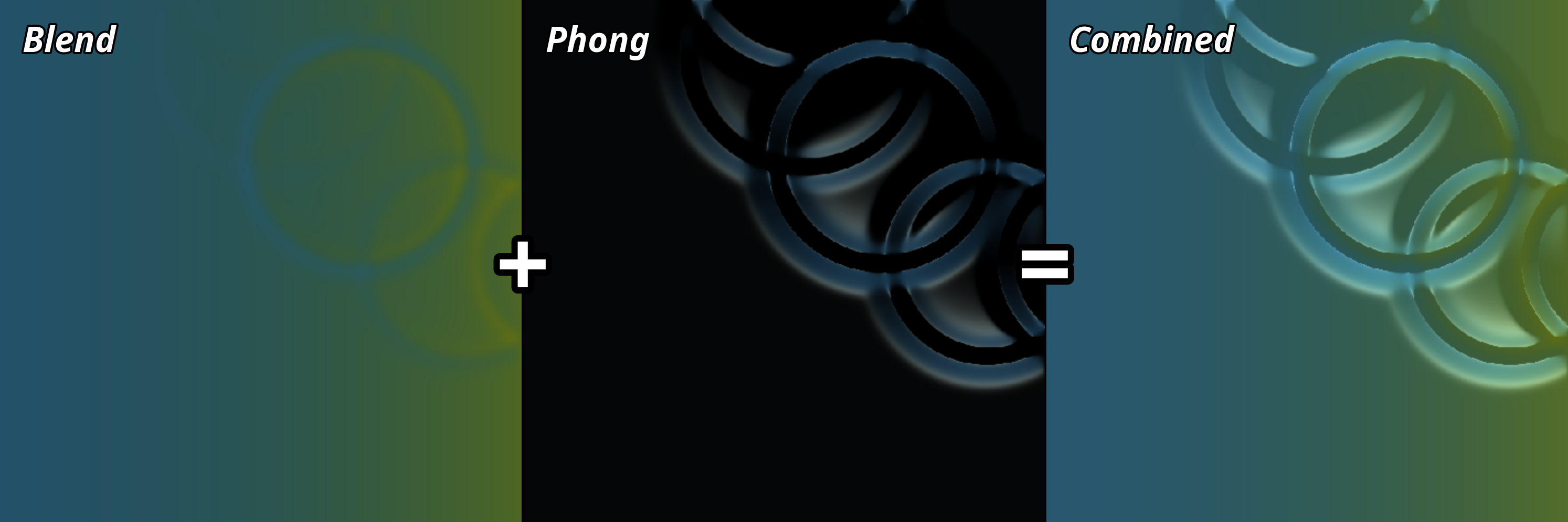
The rendering is implemented as a fragment shader, which renders onto a single triangle covering the whole viewport.
This is initialized with a very simple vertex shader.
The WebGPU shader code for this simulation can be found here.
(Warts debug lines and all)